Selected Works & Enterprise Case Studies
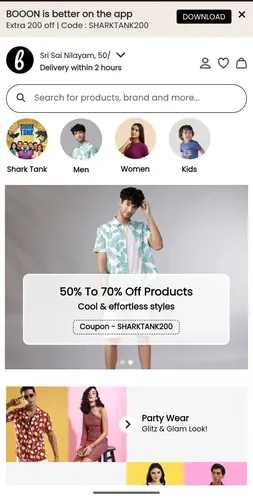
Booon — Fashion Quick-Commerce Platform
A fast-paced fashion quick-commerce platform delivering 2-hour wardrobe orders with mobile-first UX and fast checkout.
Launch Booon Live App
AVACS Workforce Management CRM
Internal enterprise portal and employee analytics suite for real-time attendance logging, task progress monitoring, and operational team metrics.

Launch AVACS Portal
Boncel Pharma — E-Commerce Platform
Full-stack pharmaceutical e-commerce platform built to streamline medical catalog distribution, product authentication, and client orders.

Launch Boncel Pharma Platform
Infinitrix Data Stream — Real-Time Telemetry
Real-time event streaming and data visualization platform providing operational telemetry and automated lead pipelines.
.webp)
Launch Infinitrix Data Stream
Elevate Data Corp — B2B Marketing Suite
Modern enterprise data intelligence and marketing platform delivering targeted B2B prospect discovery, data hygiene pipelines, and demand generation tools.

Launch Elevate Data Corp
Technical Architecture & Skill Matrix
Senior-level full-stack engineer experienced in architecting clean systems using TypeScript, React.js, Node.js, Express, MongoDB, PostgreSQL, Python, Docker, and AWS.